Understanding Variables and Data Types in JavaScript

When learning JavaScript, one of the first concepts you'll encounter is variables and data types. These are the foundation of programming because they allow us to store, manage, and manipulate data in our applications.
In this article, we'll explore:
What variables are
How to declare variables in JavaScript
The different types of data in JavaScript
Practical examples for each
What is a Variable in JavaScript?
In the world of programming, variables are named containers used to store data.
If your code were a recipe, variables would be the bowls holding your flour, sugar, and eggs so you can use them whenever you're ready.
Technically, a variable refers to a specific location in your computer’s memory (RAM) where a piece of information is stored.
This allows programs to save, retrieve, and modify data while they run.
How Variables Work
When you create a variable in JavaScript, two main things happen.
1. Declaration
Declaration means telling the computer to reserve space in memory for a variable.
let score;
Here, we created a variable named score, but it doesn't contain any value yet.
2. Assignment
Assignment means storing a value inside the variable.
score = 100;
Now the variable score contains the value 100.
You can also declare and assign a value at the same time:
let score = 100;
Modern JavaScript Variables
In modern JavaScript, we mainly use two keywords:
let used when the value may change later.
let score = 100;
score = 150;
const used when the value should not change.
const taxRate = 0.08;
Once assigned, a const variable cannot be reassigned.
Why Are Variables Needed?
Without variables, code would become hard to read, repetitive, and difficult to manage.
Here are four key reasons why variables are essential.
1. Labeling and Readability
Variables allow us to give data meaningful names.
Without variables:
0.08 * 50
This is confusing. What do these numbers represent?
With variables:
taxRate * totalBill
Now it's much clearer what the calculation means.
2. Reusability
If you need to use the same value multiple times, variables help you write it once and reuse it everywhere.
Example:
let userName = "Jonathan";

console.log("Welcome " + userName);
console.log(userName + " logged in successfully");
console.log("Profile loaded for " + userName);
If the name changes, you only update it in one place.
3. Handling Dynamic Data
Programs interact with users and react to inputs.
You don't know beforehand:
what a user will search
what score they will achieve
what message they will send
Variables act as placeholders for information that will be provided later.
let searchQuery;
searchQuery = "JavaScript tutorials";
4. Managing State
Variables help a program remember things over time.
let isLoggedIn = true;
let cartCount = 3;
let currentLevel = 5;
These variables help the program track:
whether a user is logged in
how many items are in a cart
the player's progress in a game
The DRY Principle
In programming, there is an important rule called DRY:
Don't Repeat Yourself
Instead of repeating the same value multiple times, you store it once in a variable and reuse it.
Example without DRY:
console.log("Welcome Rahul");
console.log("Rahul logged in");
console.log("Profile loaded for Rahul");
Using variables:
let userName = "Rahul";

console.log("Welcome " + userName);
console.log(userName + " logged in");
console.log("Profile loaded for " + userName);
This makes your code:
cleaner
easier to maintain
easier to update
Understanding const, let, and var in JavaScript
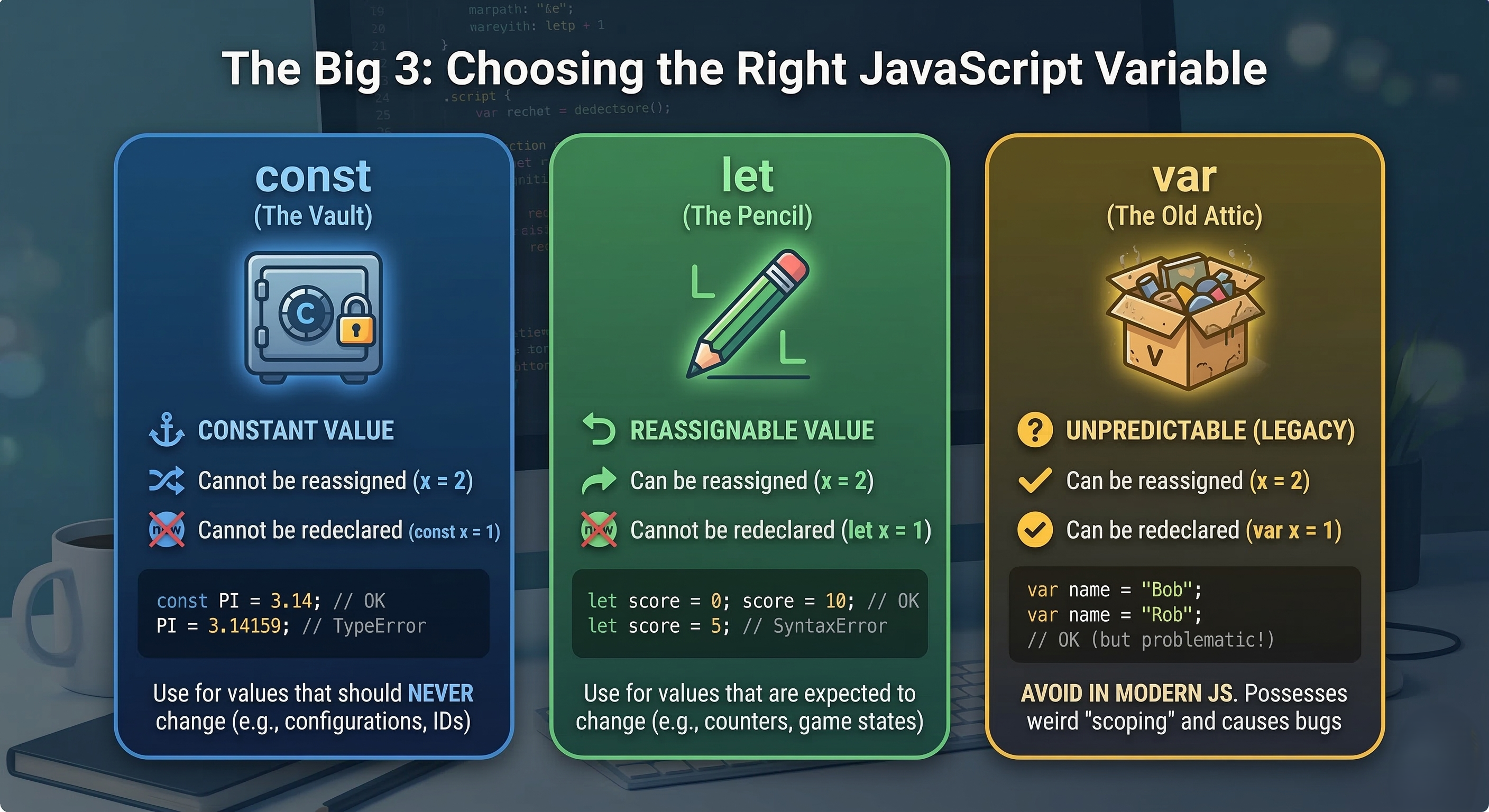
1. const — The Vault
Use const for values that should not change. The name comes from the word "constant."
Think of it like a vault: once you store something inside and lock it, you cannot replace it with a new value.
If you try to change it later, JavaScript will throw an error.
Best used for
API keys
Mathematical constants (like Pi)
User IDs
Configuration values
Important rule
A const variable must be assigned a value when it is declared.
const birthYear = 1995;

// birthYear = 1996; ❌ This will cause an error
2. let — The Open Box
Use let when a value may change over time.
Think of let as an open box where you can replace the item inside whenever needed.
It is the modern standard for variables that will be updated.
Best used for
Game scores
Loop counters
Shopping cart totals
Login status
Rule
You can declare a variable first and assign the value later, or update it multiple times.
let currentScore = 0;

currentScore = 10; // perfectly valid
3. var — The Old Attic
Before 2015 (ES6), JavaScript developers used var to declare variables.
You will still see var in older tutorials or legacy projects, but it is generally not recommended for modern development.
The problem with var
var behaves differently when it comes to scope.
It does not follow the same block boundaries that let and const do.
This can lead to unexpected bugs, where variables appear in places they shouldn’t.
Rule
If you are starting a new project, prefer let and const instead of var.
Example
var userName = "Rahul";
Which One Should You Use?
A good rule that most professional developers follow is:
1. Start with const by default
It prevents accidental changes and makes your code safer.
2. Use let when the value needs to change
For example:
let score = 0;
score = 5;
3. Avoid var in modern JavaScript
Unless you are maintaining very old codebases.
You can think of it this way:
const → default choice
let → when value changes
var → legacy code
Difference between var, let, and const
| Feature | const | let | var |
|---|---|---|---|
| Can be updated? | ❌ No | ✅ Yes | ✅ Yes |
| Can be re-declared? | ❌ No | ❌ No | ⚠️ Yes |
| Scope | Block {} |
Block {} |
Function |
| Modern usage | ✅ Recommended | ✅ Recommended | ❌ Avoid |
Primitive Data Types in JavaScript
In JavaScript, data types define the kind of value a variable can store.
For beginners, the most common primitive data types you’ll encounter are:
String
Number
Boolean
Null
Undefined
Let’s understand each one with simple examples and real-world use cases.
1. String
A String is simply text data.
It can contain letters, numbers, spaces, or symbols, and it must be wrapped in quotes.
JavaScript allows three types of quotes:
Single quotes
' 'Double quotes
" "Backticks
` `
let userName = "Rahul";
let city = "Mumbai";
In real-world applications, strings are often used to store usernames, chat messages, tweets, email addresses, and physical addresses.
2. Number
JavaScript uses a single Number type for all numeric values.
Unlike some programming languages, JavaScript does not separate integers and decimals.
Both are treated as numbers.
Real-world uses numbers are used for calculating discounts, tracking game scores, counting items in a cart, and setting timers.
let cartTotal = 250;
let discount = 20.5;
3. Boolean
A Boolean represents one of two values:
truefalse
Think of it like a light switch — it's either on or off.
Booleans are the foundation of program logic and decision making.
Booleans are often used in real-world applications to verify conditions such as whether a user is logged in, a checkbox is selected, or a game has ended.:
let isLoggedIn = false;
let gameOver = true;
4. Null
null represents an intentional absence of a value.
It means:
“This variable exists, but it currently has no value.”
Developers use null when they intentionally clear or reset something.
let searchResult = null;
This means the search ran, but no results were found.
let profilePicture = null;
Real-world uses of null include resetting form data, removing a profile picture, and clearing stored data.
5. Undefined
undefined occurs when a variable is declared but not assigned a value.
It means:
“This variable exists, but nothing has been stored in it yet.”
Example
let mysteryVariable;

console.log(mysteryVariable); // undefined
JavaScript automatically assigns undefined when a variable has no value.
The "Toilet Paper" Analogy
Many developers use a funny analogy to remember the difference between null and undefined.

Undefined
The toilet paper holder is there, but nobody ever put a roll on it.
The variable exists, but no value was ever assigned.
Null
Someone intentionally removed the empty cardboard tube.
There is deliberately nothing there.
Number / String
There is a fresh roll of toilet paper ready to use.
The variable contains an actual value.
Understanding Scope in JavaScript
Think of scope like a series of access levels inside a building.
Depending on where you stand, you might be able to see everything, or only what’s inside your current room.
In JavaScript, scope determines where variables can be accessed in your code.
There are three main types of scope:
Global Scope
Function Scope
Block Scope

1. Global Scope — The Public Park
When a variable is declared outside of any function or block, it belongs to the Global Scope.
The vibe
Think of it like a public park.
Anyone in the city (any part of your code) can visit and see what’s there.
The risk
Since everyone can access it, any part of the program can also change it, which may cause unexpected bugs.
Because of this, developers usually keep global variables to a minimum.
Example
const city = "New York"; // Global variable

function visit() {
  console.log(city); // Works!
}

visit();
The variable city is accessible inside the function because it exists in the global scope.
2. Function Scope — The Private Office
When a variable is declared inside a function, it belongs to that function's local scope.
The vibe
Think of it like a private office.
People inside the office can see everything in it, but people standing in the hallway cannot see inside.
The rule
Variables declared inside a function cannot be accessed outside that function.
Example
function greet() {
  var message = "Hello there!";
  console.log(message); // Works here
}

greet();

console.log(message); // ❌ Error: message is not defined
The variable message only exists inside the function.
3. Block Scope — The Locked Cabinet
Block scope was introduced with let and const in ES6.
A block is any section of code inside curly braces { }.
Examples include:
ifstatementsforloopswhileloops
The vibe
Think of it like a locked cabinet inside a room.
Even if you're inside the room (function), you cannot access what's inside the cabinet unless you're inside that specific block.
Why it's useful
Block scope prevents variables from leaking outside loops or conditional statements, which helps avoid bugs.
Example
if (true) {
  let secret = "I am hidden";   // Block scoped
  var notSecret = "I can leak"; // Function scoped
}

console.log(notSecret); // Works
console.log(secret);    // ❌ Error
Here:
secretis block-scoped → cannot be accessed outside the blocknotSecretis declared withvar→ it leaks outside the block
This is one of the reasons var is considered risky in modern JavaScript.
Scope Comparison
| Scope Type | Defined By | Created By | Accessibility |
|---|---|---|---|
| Global Scope | Outside any block or function | var, let, const |
Accessible everywhere |
| Function Scope | Inside a function | var, let, const |
Only inside that function |
| Block Scope | Inside { } |
let, const |
Only inside that block |
Conclusion
Variables are your labeled containers. They take the raw, chaotic data of a program and give it a name so you can reuse it without losing your mind.
Data Types are the raw materials. Whether it’s text (Strings), logic (Booleans), or math (Numbers), knowing your types ensures you aren't trying to perform math on a sentence or treat a "true/false" like a name.
Var, Let, and Const are your container types. Choosing the right one is about safety. Modern coding is all about using
constby default to keep things predictable andletonly when you absolutely have to.Scope is the visibility fence. It keeps your code tidy by making sure variables only live where they are needed. This prevents "code collisions" and keeps your program's memory lean.